

AI Preparedness Triage Review Processes
What is AI Preparedness for MSPs?
AI preparedness for MSPs means having structured processes, standardized operating procedures, and consistent data inside systems like Autotask. Without this foundation, AI cannot produce reliable insights or automation, it will only amplify existing inefficiencies.
AI Adoption is Growing, But Most MSPs Are Not Ready
AI is already reshaping the MSP landscape, whether Teams are prepared or not.
⚙️ AI adoption in MSPs has grown by roughly 40% in recent years
📈 80% of partners expect AI to drive new revenue opportunities
🧠 52% believe AI will significantly change service delivery
Yet despite this momentum, most MSPs are not operationally ready.
This is the reality most MSP owners are experiencing.
There is a difference between experimenting with AI and operationalizing it.
Why Most MSPs Fail with AI
The failure point is not the tool.
It is the foundation.
Across the MSP space, three consistent barriers show up:
⚙️ Lack of high-quality data
📊 Lack of standardized operating procedures
👥 Lack of accountability across the Team
These are not isolated problems. They compound each other.
When SOPs are inconsistent, data becomes unreliable. When data is unreliable, AI outputs become questionable.
This is not opinion, it is reflected across the industry:
“93.3% of MSPs rate data quality as a significant obstacle to AI initiatives.”
Source: Lansweeper, AI Adoption in Managed Services Report
This reinforces a simple truth.
AI does not fail because it lacks capability. It fails because the environment it operates in is inconsistent.
What is an MSP Triage Process and Why Does It Matter?
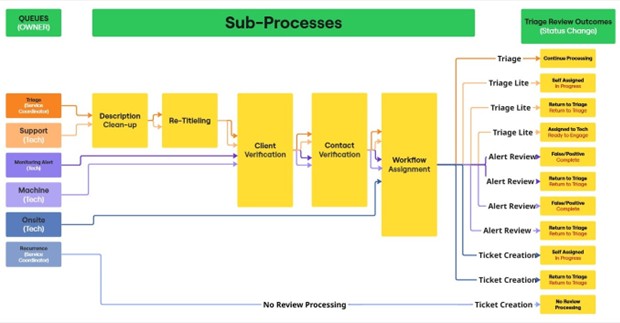
An MSP triage process is the structured method for reviewing, organizing, and routing client requests before work begins.
It determines how work enters your system and how efficiently it moves forward.
Without structured triage, most MSPs operate like this:
Ticket enters
Lands in a queue
A Technician figures it out
That is not a process. That is reactive work management.
The impact shows up quickly:
🔧 Inconsistent Technician performance
⏱️ Slower response and resolution times
📉 Increased stress across the Team
📊 Reporting that cannot be trusted
Triage is not administrative overhead. It is the control point for operational performance.
How to Structure an MSP Triage Process in Autotask
A structured triage model introduces clarity at the intake level.
Step 1, Separate Intake Destination Queues
Instead of one overloaded queue, define six:
Triage
Support
Monitoring Alerts
Machine-to-Machine Alerts
OnSite
Recurring Tickets
Ownership becomes clear immediately.
The Service Coordinator manages intake control. The Technical Team focuses on execution.
Step 2, Define Process Flows, Not Just Queues
Every ticket should follow a defined path:
Triage
Triage Lite
Alert Review
Ticket Creation
Each flow leads to a specific outcome:
Continue Processing
Request for More Information
Self-Assignment and Engagement
Returned to Triage
Assigned to Another Technician
False Positive, Completed
This eliminates ambiguity and creates consistency.
Step 3, Standardize the Core Triage Actions
This is where efficiency is created or lost.
Description Cleanup
Remove signatures, disclaimers, and filler text.
Focus only on the facts of the request.
Retitling Tickets
Replace vague titles with clear summaries.
This improves visibility, reporting, and prioritization.
Client and Contact Verification
Incorrect assignments create downstream issues in billing and communication.
Triage is where these errors should be caught.
Workflow Assignment via Priority Field
This is the most critical step.
Instead of using priority only for urgency, use it as a workflow selector.
Examples:
Quick Hit MACs
Small MACs
Large MACs
Installs
Projects
Recurring Engagements
Now each ticket follows a defined operational path.
Triage Lite and Alert Review, Where MSPs Gain Back Time
Triage Lite
Triage Lite allows a Technician to apply structured decision-making in specific situations:
👨💻 Self assign and engage
🔄 Return to triage
👥 Assign to another Technician
It maintains consistency without slowing execution.
Alert Review
Most MSPs allow alerts to automatically become tickets.
That creates unnecessary workload.
A structured alert review process introduces a filter:
⚠️ False positive, close immediately
✅ Legitimate issue, return to triage
This simple step can significantly reduce wasted effort.
Supporting data reinforces the opportunity:
⚙️ AI-enabled automation can reduce manual ticket handling by up to 45%
Source: Zipdo, AI in MSP Industry Statistics
But this only works when alerts and tickets are already structured.
Why Triage is the Foundation of AI-Ready Data
Every triage step contributes to one outcome, data quality.
When tickets are:
Consistently categorized
Clearly written
Properly assigned
Routed through defined workflows
The data inside Autotask becomes usable.
This is what AI depends on.
As one report puts it:
“Data quality forms the foundation upon which effective and impactful AI solutions are built.” Source: Lansweeper
Without structured triage:
AI produces inconsistent insights
Reporting becomes unreliable
Decision-making slows down
With structured triage:
AI identifies patterns
AI highlights inefficiencies
AI supports better decisions
The difference is not the tool. It is the system behind it.
What Happens When MSPs Skip This Step
When MSPs layer AI on top of unstructured operations, the outcome is predictable:
⚙️ Inconsistent workflows get automated
📉 Poor data quality gets scaled
😓 Confusion increases across the Team
This is why many AI initiatives are stalled.
They are built on unstable foundations.
Where MSP Owners Should Start
If the goal is to improve operations and prepare for AI, start with the client requesting a lifecycle.
Map it from New to Complete and evaluate:
Is each step defined?
Is it documented?
Is it consistently followed by the Team?
In practice, focusing on intake and triage alone can eliminate 60 to 70 percent of operational challenges.
This is not a tooling problem.
It is a process clarity problem.
What Actually Makes AI Work in an MSP
AI works when the operation is structured.
That requires:
Standardized operating procedures
A disciplined triage process
Consistent execution across the Team
Clean, reliable data inside Autotask
Everything else comes after that.
AI is not a shortcut to better operations.
It is a multiplier of what already exists.
For MSPs that build the right foundation, it becomes a powerful advantage.
For those that do not, it simply exposes the gaps faster.
FAQ, MSP AI Preparedness
Q: Can AI fix poor MSP operations?
A: No. AI amplifies existing processes. It does not correct them.
Q: What is the first step toward AI readiness?
A: Improving intake and triage to ensure consistent workflows and data.
Q: Why is data quality critical for AI?
A: Because AI relies entirely on structured, accurate inputs to generate useful outputs.
Q: How much impact can triage improvements have?
A: In many cases, improving intake and triage can eliminate 60 to 70 percent of operational inefficiencies.
Call to Action
For a FREE strategy call with the channel’s #1 Operational Strategist, contact [email protected]
with the subject line: “AI Preparedness”